
This year, if you’ve upgraded and discovered the new QuickBooks Shipping Manager (ShipEngine integration), chances are you’ve run into some frustrating limitations. What once was a reliable tool for managing UPS, FedEx, and USPS shipments now feels like a step backward for many businesses.
Shipping Manager users are reporting issues such as:
❌ No support for multiple packages in a single shipment
❌ Inability to bill to customer shipping accounts
❌ No option for test label printing without paying for postage
❌ Authentication errors with carrier accounts (especially UPS)
❌ Overall reduction in flexibility compared to the legacy Shipping Manager
For businesses processing multiple shipments a day, this new shipping experience adds inefficiency and frustration.
Why Consider StarShip by V-Technologies?
Unlike the scaled-down QuickBooks Shipping Manager, StarShip QuickBooks shipping software provides full-featured shipping that works for any business size. Here’s what makes StarShip a better fit for QuickBooks users:
✅ Multi-Carrier & Multi-Mode Flexibility
StarShip supports parcel and LTL shipments across carriers like UPS, FedEx, USPS, DHL, regional carriers, and dozens of freight providers, all from one interface.
✅ Seamless QuickBooks Integration
StarShip integrates bi-directionally with QuickBooks Software (both QuickBooks Online and Desktop Enterprise). Freight costs, tracking numbers, and shipment details flow automatically to invoices and orders.
✅ Multi-Package Shipping & Rate Shopping
Unlike the new QuickBooks Shipping Manager, StarShip allows you to ship multiple boxes under one shipment, while also comparing real-time carrier rates to ensure the lowest-cost option.
✅ Customer Account Billing
Need to bill directly to your customer’s UPS or FedEx account? No problem, StarShip makes it easy.
✅ International & Advanced Documentation
StarShip automatically generates commercial invoices, customs forms, and even supports HazMat shipping.
✅ Scalability for Growth
Whether you’re shipping 400 packages per month or over 2,000, StarShip is designed to handle all volumes with automation, reporting, and workflow optimization.
The Bottom Line
If you feel like the new QuickBooks Shipping Manager has clipped your wings, StarShip by V-Technologies gives you the freedom and functionality you need to keep shipping smooth, accurate, and cost-effective.
Don’t settle for a downgrade, choose a solution that grows with your business.
|

|
|
Frequently Asked Questions
What’s the difference between QuickBooks Shipping Manager and StarShip?
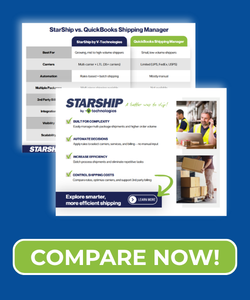
The new QuickBooks Shipping Manager (powered by ShipEngine) offers only basic parcel shipping for UPS, FedEx, and USPS. StarShip supports both parcel and LTL shipments, multi-carrier rate shopping, customer account billing, and advanced documentation—all tightly integrated with QuickBooks.
Can StarShip work with QuickBooks Enterprise and QuickBooks Online?
Yes. StarShip integrates bi-directionally with both QuickBooks Enterprise (Desktop) and QuickBooks Online, automatically updating invoices, orders, and tracking details.
Does StarShip support multiple package shipments?
Yes. Unlike QuickBooks Shipping Manager, StarShip fully supports multi-box shipments, letting you consolidate multiple packages under one shipment and tracking number.
Can I bill freight charges to a customer’s UPS or FedEx account in StarShip?
Yes. StarShip allows you to use your own carrier accounts or bill to a customer’s account, giving you complete flexibility.
Does StarShip handle international shipping?
Yes. StarShip automatically generates customs forms, commercial invoices, streamlining the international shipping process and making it ideal for global shippers.
Is StarShip only for high-volume shippers?
No. StarShip is scalable—it works just as well for businesses shipping 40 packages per day as it does for those shipping hundreds. The automation saves time at any scale.